OpenCV 5.0: What Actually Changed and Why It Matters
OpenCV 5.0 rewrites the DNN engine, pushes ONNX coverage past 80%, runs VLMs natively, and drops the C API. A developer's take on what's real, what's promising, and where the gaps still are.

The Biggest Leap in Years?
For more than two decades, OpenCV has been the piping for computer vision research, robotics, and industrial systems. When a library is this deeply embedded in production codebases, major version shifts take time. Waiting for OpenCV 5.0 began to feel like waiting for winter in Game of Thrones.
The release checklist reads like a wish list: a rewritten DNN engine with 80%+ ONNX coverage, native VLM/LLM execution, FlashAttention-style fusion, a unified hardware acceleration layer, and the C API finally gone. On paper, this is the modernization everyone asked for.
The reality is more nuanced. Let's break down what actually shipped, what's genuinely useful today, and where the fine print matters.
1. The DNN Engine Rewrite
The most critical problem in OpenCV 4.x was its DNN module. It loaded models as a flat list of layers, struggled with dynamic shapes, and covered less than 23% of the ONNX operator specification. For anyone trying to run a modern transformer or diffusion model, this was the wall.
OpenCV 5.0 replaces it with a typed operation graph engine. It analyzes the entire model graph to perform constant folding, operator fusion, and memory optimizations. ONNX operator coverage has jumped to over 80%.
What the New Engine Unlocks:
- Dynamic and Symbolic Shapes: No more brittle input shape requirements.
- Control Flow: Support for
IfandLoopsubgraphs. - Quantize/Dequantize (QDQ) Graphs: Native execution of quantized models.
- Attention Fusion: Collapses
MatMul>>Softmax>>MatMulpatterns into a single FlashAttention-style fused operation.
Four Engines, One API
Rewrites break things. OpenCV's mitigation here is smart: they ship four engine backends behind the same Net API. You pick one at model-load time via cv::dnn::EngineType:
| Engine | Meaning |
|---|---|
| ENGINE_AUTO (3) | Default. Tries the new engine first, falls back to classic on failure. |
| ENGINE_NEW (2) | Force the new graph engine. CPU only for now. |
| ENGINE_CLASSIC (1) | Force the old 4.x engine. Required for non-CPU backends (CUDA, OpenVINO). |
| ENGINE_ORT (4) | Use bundled ONNX Runtime. Requires WITH_ONNXRUNTIME=ON at build time. |
1import cv2 as cv
2
3# ENGINE_AUTO (default): Tries the new engine first, falls back to classic if it fails
4net = cv.dnn.readNetFromONNX("model.onnx")
5
6# Explicitly pin the new graph-based engine
7net = cv.dnn.readNetFromONNX("model.onnx", engine=cv.dnn.ENGINE_NEW)
In C++:
1#include <opencv2/dnn.hpp>
2using namespace cv;
3
4// Pin the new engine
5dnn::Net net = dnn::readNetFromONNX("model.onnx", dnn::ENGINE_NEW);
For GPU execution, you can either target the classic engine (ENGINE_CLASSIC) or link ONNX Runtime (ORT) directly at compile-time:
1# Enable built-in ONNX Runtime execution provider via CMake
2cmake -DWITH_ONNXRUNTIME=ON -DDOWNLOAD_ONNXRUNTIME=ON ..
[!WARNING] The new graph engine is CPU-only at launch. If your pipeline depends on GPU inference via CUDA or OpenVINO, you need
ENGINE_CLASSICorENGINE_ORT. TheENGINE_AUTOdefault will silently fall back to the classic engine in these cases, which is convenient but can mask which engine is actually running your model. Worth checking explicitly in production.
2. Benchmark: OpenCV 5 DNN vs. ONNX Runtime
The graph optimizations make the native CPU inference engine competitive with (and often faster than) ONNX Runtime 1.25.1 across a range of architectures.
| Model | OpenCV 5 DNN (ms) | ONNX Runtime (ms) | Speed Difference |
|---|---|---|---|
| XFeat | 6.56 | 8.61 | 31.2% faster |
| DINOv2 Small | 23.78 | 29.58 | 24.4% faster |
| YOLOv8n | 10.90 | 12.15 | 11.5% faster |
| YOLOX-S | 23.46 | 25.16 | 7.2% faster |
| RF-DETR | 102.01 | 106.49 | 4.4% faster |
| OWLv2 | 1,090.00 | 1,489.00 | 36.6% faster |
| BiRefNet | 7,178.00 | 9,503.14 | 32.4% faster |
[!NOTE] Hardware setup: Intel Core i9-14900KS, Ubuntu 24.04 LTS. Lower latency is better. Full benchmark suite available at OpenCV 5 DNN Benchmarks.
The OWLv2 result (36.6% faster on an open-vocabulary detector) is the most telling. These are exactly the transformer-heavy architectures that 4.x struggled with. Beating ORT on CPU here means the graph optimizations and attention fusion are doing real work, not just matching a reference runtime.
That said, these are CPU-only numbers. For GPU-heavy production pipelines, the story is different. You'll still be routing through ORT's CUDA/TensorRT execution providers. Native GPU support in the new engine is on the roadmap but not in this release.
3. Generative AI and VLMs in OpenCV
OpenCV 5.0 introduces support for running generative models locally without external wrappers.
Local LLM and VLM Execution
The engine includes a native tokenizer and a KV-cache for autoregressive decoding. This lets you run models like Qwen 2.5, Gemma 3, and PaliGemma directly. For vision-language tasks (image-to-text), PaliGemma runs entirely through the standard Net::forward() pipeline.
In the team's tests, asking Qwen 2.5 "What is OpenCV?" through OpenCV's engine produced output that matched ONNX Runtime token for token. That's a good sign for correctness.
[!WARNING] Reality check: VLM and LLM execution runs through the new graph-based DNN engine, which is CPU-only. There is no GPU path for these models in the native engine. Running a vision-language model on CPU is usable for offline or single-image tasks (captioning a photo, OCR post-processing), but it's a non-starter for anything resembling real-time inference or batch workloads.
The alternative is
ENGINE_ORT, which delegates inference to ONNX Runtime (Microsoft's inference engine) and can use its CUDA/TensorRT execution providers for GPU. But ORT requires building OpenCV from source with-DWITH_ONNXRUNTIME=ON. It's not available in the pip packages. At that point, you're effectively using ORT with an OpenCV API wrapper, not OpenCV's own engine.The honest read: VLM support is a proof-of-concept in this release. It proves the graph engine's ONNX coverage is broad enough to handle autoregressive models. It becomes genuinely useful once the new engine gets native GPU support.
Single-Pass Inpainting with LaMa
You can perform high-quality object removal in a single forward pass using the LaMa model.
1import cv2 as cv
2
3# Load the LaMa model
4net = cv.dnn.readNetFromONNX("lama.onnx")
5
6# Pack the image and the removal mask into a single blob
7blob = cv.dnn.blobFromImages([img, mask], scalefactor=1/255.0)
8net.setInput(blob)
9
10# Run inpainting
11out = net.forward()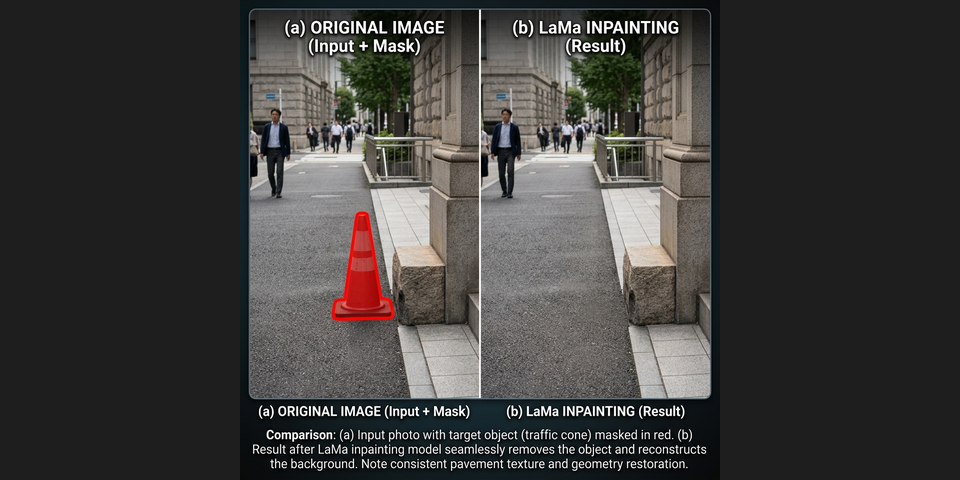
A ready-to-run version lives at samples/dnn/inpainting.py in the 5.x branch. There's also a diffusion-based inpainting sample (samples/dnn/ldm_inpainting.py) if you want to go further.
4. Modern Learned Features and 3D Vision
The old monolithic calib3d module has been split into three focused modules:
This is a genuine structural improvement, not a cosmetic reshuffle. The old calib3d module had become a junk drawer of loosely related functionality.
Key Upgrades:
- Learned Matchers: The
Featuresmodule (replacingFeatures2D) adds CNN-based keypoint detectors likecv::ALIKEDandcv::DISK, alongside the attention-basedcv::LightGlueMatcher. The classic detectors (SIFT, ORB, FAST) remain. The less-used ones moved toopencv_contrib. - Multi-Camera Calibration:
calibrateMultiviewhandles global bundle adjustment for N-camera rigs, plusregisterCamerasfor pairwise extrinsics. Hand-eye and robot-world calibration are included for robotics use cases. - 3D Point Clouds: Direct I/O for
.plyand.objformats vialoadPointCloud,savePointCloud,loadMesh, andsaveMesh. - Dense RGB-D Fusion: TSDF, HashTSDF, and ColorTSDF volumes, plus visual odometry.
- USAC Backend: The USAC framework (with MAGSAC) is now the default for robust estimations (homography, fundamental matrices), replacing legacy RANSAC.
5. Core Modernization & the HAL
The baseline core gets a performance-driven refactor:
- New Types: Adds native
FP16(cv::hfloat,CV_16F),BF16(cv::bfloat,CV_16BF),bool(CV_Bool), and 64-bit integers. - 0D/1D Tensors:
cv::Matnow natively supports true 1D arrays (avoiding the forcedNx12D shape of 4.x) and 0D scalars. Broadcasting and multi-dimensional operations (transposeND,flipND) simplify matrix transformations. - Python Improvements: NumPy 2.x support, deeper integration, and named (keyword) arguments for C++ algorithms. You can write
cv.someAlgorithm(threshold=0.5)instead of memorizing positional parameter order. - TRUCO Contour Finding: A new Threaded Raster Unrestricted Contour Ownership algorithm replaces the legacy contour finder, yielding a multi-threaded speedup of several times.
- Unified HAL: The Hardware Acceleration Layer (HAL) has been standardized. Intel IPP, Qualcomm FastCV, RISC-V Vector (RVV), and Arm KleidiCV plug directly into the HAL contract. Universal Intrinsics 2.0 maps a single vector codebase to SSE, AVX2/512, NEON, SVE, and RVV. The team reports 3-4x speedups on common ARM operations like resizing and warping.
[!CAUTION] API Breaking Change: The legacy C API (including functions like
cvCreateMat()and structures likeCvMat) is removed. OpenCV 5.0 represents a clean break from the 1.x API era.
Documentation Overhaul
Worth noting: the docs have been rebuilt from plain Doxygen to a Sphinx + Doxygen pipeline. Persistent left-hand navigation, tutorials alongside API reference, Python signatures shown next to C++, and a link checker in pre-commit. This sounds minor until you've spent an afternoon hunting for a function signature in the old layout.
6. What's Still Missing
OpenCV 5.0 is a foundation release. Some gaps are by design and will be filled across the 5.x cycle:
- No native GPU in the new DNN engine. This is the big one. The graph-based architecture was built to support it, but the initial release is CPU-only. If you need GPU inference today, you're going through
ENGINE_CLASSIC(with CUDA/OpenVINO) orENGINE_ORT. Native GPU support is on the roadmap. - No non-CPU HAL for pre/post-processing. The HAL has been designed with a non-CPU path for GPUs and NPUs, but it's not wired up yet. In practice, this means your pre-processing (resize, normalize, letterbox) and post-processing (NMS, overlay drawing) still run on CPU even if inference is on a GPU. Those data round-trips are often the real bottleneck in production pipelines.
- ENGINE_AUTO opacity. The default
ENGINE_AUTOsilently falls back from the new engine to the classic engine if a model fails to load. Convenient for migration, but it means you might not know which engine is running without checking explicitly.
These are architectural bets, not oversights. The plumbing is in place. Whether the GPU and non-CPU HAL work ships in 5.1 or 5.3 will determine how fast production workloads can fully migrate.
7. Installation and the GPU Question
As of June 2026, the OpenCV 5.0 pip package has not yet been published to PyPI. The latest available version via pip install opencv-python is still 4.13.0.92. The official post mentioned a June 8 pip release date, but it hasn't landed. To use OpenCV 5.0 today, you need to build from the 5.x branch on GitHub.
For reference, here are the 4.13 wheel sizes on Windows (amd64). Expect 5.0 to be in a similar range or slightly larger given the new DNN engine:
| Package | Wheel Size |
|---|---|
opencv-python | 38.3 MB |
opencv-python-headless | 38.2 MB |
opencv-contrib-python | 44.3 MB |
opencv-contrib-python-headless | 44.2 MB |
CPU vs. GPU: Still Separate Worlds
The pip packages are CPU-only. This has not changed in 5.0 and likely won't. The reasons are practical: CUDA-enabled builds are too large for PyPI's size limits, and they're tightly coupled to specific CUDA Toolkit and cuDNN versions on the user's machine.
If you need GPU inference:
- CUDA/OpenVINO via
ENGINE_CLASSIC: Build OpenCV from source with-DWITH_CUDA=ON -DOPENCV_DNN_CUDA=ONand the appropriateCUDA_ARCH_BINfor your GPU. This uses the old 4.x-style DNN engine, not the new graph engine. - CUDA via
ENGINE_ORT: Build with-DWITH_ONNXRUNTIME=ONand link against ONNX Runtime's CUDA execution provider. This routes through ORT, not OpenCV's native engine. - The new graph engine: CPU-only for now. No GPU path exists yet.
OpenCV does not auto-detect CUDA at runtime. GPU support is a compile-time decision. If you pip install opencv-python, you get a CPU build. Period.
[!TIP] To check if your installed OpenCV has CUDA support:
python1import cv2 2print(cv2.cuda.getCudaEnabledDeviceCount()) # 0 = CPU-only build
Summary of Key Differences
| Feature | OpenCV 4.x | OpenCV 5.0 |
|---|---|---|
| ONNX Operator Coverage | ~22% | 80%+ |
| Dynamic Shapes | Brittle / Unsupported | Natively Supported |
| DNN Engine | Flat layer list | Typed graph with fusion |
| Engine Backends | Native only | Classic, New, ORT, Auto |
| VLM / LLM Tokenizers | Not Available | Built-in |
| 0D / 1D Tensors | Forced 2D representation | Natively Supported |
| Data Types | FP32, INT8, UINT8 mainly | FP16, BF16, bool, int64 |
| Minimum C++ Standard | C++11 | C++17 |
| C API Support | Deprecated / Present | Removed |
| Documentation | Doxygen | Sphinx + Doxygen |
OpenCV 5.0 preserves the APIs you are familiar with while providing a faster, cleaner foundation for modern AI workloads. The restraint in the design is notable: three DNN engines behind one API, classic detectors alongside neural ones, and the old engine preserved for compatibility. It modernizes aggressively without leaving its user base behind.
If you have models that failed to load in OpenCV 4.x, grab the 5.x branch and try them again.
Previous Post
From 2B to 31B: The Evolution of Google's Gemma Models
Next Post
Gemma 4: Deep Dive into Encoder-Free Architecture and Local Agentic Capabilities
If the article helped you in some way, consider giving it a like. This will mean a lot to me. You can download the code related to the post using the download button below.
If you see any bug, have a question for me, or would like to provide feedback, please drop a comment below.