Building an Autonomous Agentic Blog Pipeline
Upgrading manual blogging workflow into a fully autonomous agentic pipeline, the failures encountered, and the architecture that fixed them.

The objective is simple. Give the agent a topic, your project and it returns a fully researched, formatted blog post. The reality is messy. In this post, we document the journey of building an autonomous agentic blog pipeline. We will look at our initial approach, the failures we encountered, the challenges that still remain.
The Initial Architecture
Our first attempt at automating blog generation was a monolithic script. The user provided a topic, and a single overarching orchestrator attempted to handle everything. From earching the web, scraping content, drafting the markdown, and generating the banner image. This approach was fundamentally flawed. The context window became saturated quickly. The agent lost track of its objectives halfway through the pipeline.
Detailed Flowchart
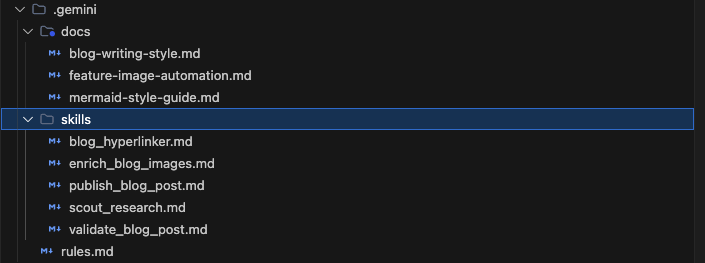
Agent Skills Structure
The skills were tested using Antigravity IDE as harness. The pipeline is purely harness driven with no direct LLM API calls. I have also built a similar pipeline using AWS strands, but that is discussion for another day.
Where It Failed?
The pipeline broke down in four key areas:
- Unreliable Web Scraping: The script relied heavily on
BeautifulSoup(bs4) for parsing web content. When the local Python environment lacked the specific dependency, the entire pipeline crashed. Furthermore, many modern sites block simple scrapers, leading to empty context windows and hallucinated technical content. - Tool Discovery and Execution: The orchestrator struggled to sequence tool calls correctly. It would often attempt to write the blog post before the research phase had completed, or it would call image generation tools with incorrect arguments.
- Writing Style Violations: Despite prompt instructions, the LLM consistently drifted into marketing speak. It overused phrases like "diving deep" and "utilizing robustly," breaking our strict technical tone guidelines.
- Broken Mermaid Diagrams: The agent routinely hallucinated Mermaid syntax. It used square brackets
[Text]instead of stadium nodes(["Text"])for flowcharts, and it illegally placedrxandryrounding attributes insideclassDefdefinitions. This caused the markdown renderer to crash.
How We Improved It: Decoupling Skills
We threw away the monolith and adopted a decoupled, skill-based architecture. Instead of one massive prompt, we broke the workflow into specialized, discrete skills: scout_research, publish_blog_post, and enrich_blog_images.
1. The Scout Researcher
The scout_research skill operates independently of the publishing pipeline. Its sole job is to scrape the web and read local workspace files. Distilling the information into dense .md artifacts located in a dedicated research/ directory. By the time the writer agent starts drafting, it is reading from curated local context.
The scout researcher employs a two-pronged approach. First, it queries web search APIs to build a foundational understanding of the requested topic. Second, it uses local file-reading capabilities to ingest existing code files and project documentation. This hybrid approach ensures generic accuracy and contextual relevance.
For example, when writing about our feature image generator, the scout agent pulls directly from feature-image-generator/main.py. It analyzes the argparse configuration, the specific fonts imported (like Outfit-Bold.ttf), and the compositing logic. This raw data is synthesized into a master _plan.md artifact that serves as the ground truth for the writer agent.
2. Multi-Source Scraping Fallbacks
To fix the brittleness of our image scraper, we completely rewrote scrape_image.py. The original implementation relied on a brittle web scraper. When the target website changed its DOM structure or blocked the scraper via Cloudflare, the script failed silently. The agent would then hallucinate an image path and proceed, resulting in a broken markdown link.
We replaced the scraper with a robust, multi-source waterfall fallback system built in Python. Instead of relying on a single API, the script transitions across three distinct data sources to guarantee a valid image asset is always retrieved.
- Primary: Wikimedia Commons. The script uses the MediaWiki API to search for high-quality, open-source logos and SVG graphics. This is the preferred source because the images are guaranteed to be unencumbered by restrictive licenses.
- Secondary: Clearbit Logo API. If Wikimedia Commons returns a 403 Forbidden or fails to find a relevant logo, the script gracefully degrades to the Clearbit API. This is highly effective for fetching corporate branding and product logos simply by querying the company's domain name (e.g.,
huggingface.co). - Tertiary: Google Favicons. APIs go down. Rate limits get hit. If both Commons and Clearbit fail, the script initiates a last-resort fallback. It constructs a request to the undocumented Google Favicon service (
https://www.google.com/s2/favicons?domain=...&sz=128). This guarantees that, at the very least, a low-resolution recognizable icon is successfully downloaded and injected into the blog post.
This waterfall architecture eliminated our broken-link problem entirely. If one source returns an HTTP 403 or times out, the script autonomously handles the exception and degrades to the next available source without requiring agentic intervention.
3. The Feature Image Compositing Pipeline
Generating a blog feature image used to be a manual chore. We automated this by chaining a generative AI model with a programmatic Python compositing script.
The workflow begins with the agent generating a raw image prompt aligned with the blog post's core technical concept. The generated prompt is specifically tuned for a cinematic anime landscape style (inspired by Makoto Shinkai), enforcing vast skies and dramatic lighting while prohibiting UI overlays, neon, or text.
Once the raw image is generated, the agent passes the file path to feature-image-generator/main.py. This script handles the heavy lifting:
- It uses the
Pillowlibrary to crop the raw generation to an exact 960x480 widescreen ratio. - It applies a dark, semi-transparent gradient overlay to the left side of the image to ensure text legibility.
- It dynamically calculates font metrics for
Outfit-BoldandInter-Mediumto render the blog post title and subtitle. - It composites the previously scraped brand logo (e.g., the Python or Hugging Face logo) into the corner.
The result is a production-ready, beautifully formatted banner image created entirely without human intervention.
4. Interactive Gate Checks
Automation without oversight leads to compounding errors. We updated the publish_blog_post skill to enforce an explicit Step 1 Checkpoint.
The agent pauses execution and uses the UI to present the user with a structured selection modal. The modal contains Title options and the Image Generation Prompt. The pipeline execution is completely blocked until human approval is granted. This ensures the foundational tone and visual theme of the post are correct before the agent spends compute resources drafting 2000 words of markdown.
5. Strict Scripted Validation
We quickly realized that you cannot prompt an LLM into perfect compliance. No matter how many times the system prompt stated "Do not use banned marketing phrases", the model would eventually hallucinate them.
To solve this, we built the validate_blog_post skill as a rigorous quality assurance mechanism. It runs a series of PowerShell scripts to mechanically verify the post.
The validation covers four main categories:
Structural Checks
The script parses the YAML frontmatter. It verifies that exactly 10 required fields are present: title, author, date, category, tags, excerpt, description, featuredImage, imageAlt, and code_link. It also validates that the category matches one of the pre-approved exact strings (e.g., AI/ML, Automation).
Asset Verification
The script extracts all image paths from the markdown using regex (!\[.*?\]\((.*?)\)). It then checks the local filesystem using Test-Path. If the agent hallucinated a path, or if the python script failed to save the image, the validator immediately flags it. It also checks that the internal relative links point to .md files that actually exist in src/content/blog/.
Style Compliance The script executes a brute-force text scan against a dictionary of banned phrases.
1$banned = @("It is imp" + "ortant to note", "In today's fast-" + "paced world", "robust" + " solution", "cutting-" + "edge")
2foreach ($phrase in $banned) {
3    $matches = [regex]::Matches($content, [regex]::Escape($phrase), 'IgnoreCase')
4    # Flag invalid
5}
Mermaid Syntax Verification
Mermaid flowcharts are notoriously difficult for LLMs. The validator specifically targets the most common hallucinations. It parses ````mermaid``` blocks and flags any use of square brackets [Text], forcing the agent to use the proper stadium node syntax (["Text"]). It also flags any use of rx or ry attributes inside a classDef definition, which are deprecated and crash our renderer.
[!TIP] Do not try to make an LLM follow complex formatting rules purely through prompting. Prompting works for generative creation. Scripted validation works for compliance. Build validators that parse the output and force the LLM to correct itself before considering the task complete.
Where It Still Lags Behind
The pipeline is significantly more robust, but we have not solved every problem.
Hallucinating Paths: When tracking context across multiple files (the blog post, the feature image, the raw scraped logos), the agent occasionally hallucinates relative paths. We still rely heavily on validation scripts to catch broken image links.
Deterministic vs. Generative: There is an ongoing tension between the creativity required to draft a compelling blog post and the deterministic logic required to execute a multi-step filesystem pipeline. Combining both states of mind in a single agent invocation is difficult.
Looking Forward
My next step is to integrate the pipeline more deeply with IDE environment via MCP. By allowing the agent to read project context directly from GitHub repositories, we can minimize web scraping entirely for technical updates.
The shift from a monolithic prompt to a decoupled, skill-based architecture was the inflection point. By treating the agent not as a magical text generator, but as a worker constrained by strict inputs, checkpoints, and scripted validators, we turned a fragile experiment into a dependable pipeline.
Previous Post
Gemma 4: Deep Dive into Encoder-Free Architecture and Local Agentic Capabilities
Next Post
GLM-5.2 Deep Dive: Z.ai's 744B MoE Model with 1M Context Window
If the article helped you in some way, consider giving it a like. This will mean a lot to me. You can download the code related to the post using the download button below.
If you see any bug, have a question for me, or would like to provide feedback, please drop a comment below.