CodeContinue: Taking Back Control from Cloud-Based Code Completion
Microsoft killed IntelliSense to push developers toward cloud-based, data-hungry agentic coding. CodeContinue, an LLM-powered Sublime Text plugin that gives you smart 1-2 line code completion without surrendering control, data, or your coding workflow.

Why I Built CodeContinue?
Let me start with what triggered this project: Microsoft recently announced the end-of-life for IntelliSense.
Not because the technology became obsolete. Not because developers stopped needing it. But because they want to push everyone toward cloud-based, server-dependent "agentic coding" solutions. Solutions where you pay with your data, your privacy, and increasingly, your money.
I get it, agentic coding has its place. AI agents that write entire functions, refactor codebases, and generate boilerplate can be incredibly useful. But here's the thing: I don't always want an agent taking over my code.
Sometimes I just want a simple, smart suggestion for the next 1-2 lines. I want to stay in control of the logic I'm building. I want to think through the problem myself, with just enough assistance to speed up the tedious parts - syntax, common patterns, repetitive structures.
That's why I built CodeContinue: an LLM-powered Sublime Text plugin that brings back intelligent inline code completion without the cloud dependency, without the data harvesting, and without taking away your control.
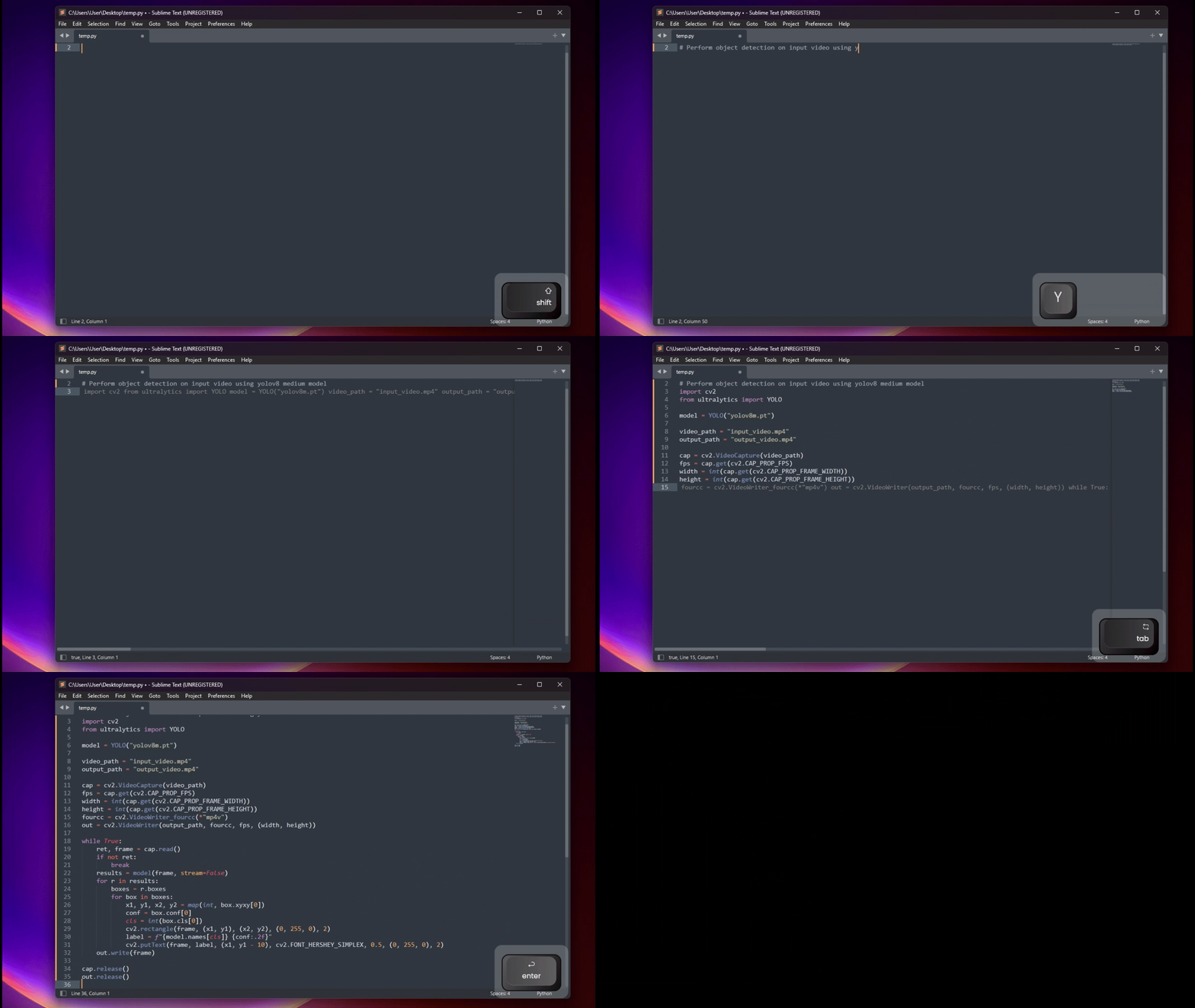
The Problem with Modern Code Completion
The landscape of developer tools has shifted dramatically in the past few years. We lost simple, fast, local code completion (IntelliSense, basic autocomplete), privacy, control, and choice. We're being pushed toward cloud-based AI coding assistants (GitHub Copilot, Cursor, etc.) that collect our data, take over our code, and lock us into their ecosystems.
Don't get me wrong. I do use AI coding tools. They're powerful. But the all-or-nothing approach bothers me. Why can't we have a middle ground? Why can't we have intelligent, context-aware completion that performs the following:
- Runs on models we choose (local or remote)
- Suggests 1-2 lines instead of entire functions
- Keeps us in the driver's seat
- Works in our preferred editor (Sublime Text, in my case)
That's the gap CodeContinue fills.
What CodeContinue Does Differently
CodeContinue is deliberately minimalist. It's not trying to be an AI agent. It's trying to be what IntelliSense should have evolved into.
Core Philosophy
- Minimal Suggestions: Only 1-2 lines of code at a time (You can increase the context if required)
- Your Choice of LLM: Works with any OpenAI-compatible API, use any open source model, or your own fine tuned models.
- Context-Aware: Sends surrounding code for intelligent suggestions
- Simple Workflow:
Enterto request,Tabto accept - Privacy-First: Use local models or your own API endpoints
- Lightweight: No dependencies, no bloat, no vendor lock-in.
You are still free to use cloud APIs, but CodeContinue is not forced to use them.
How CodeContinue Works?
The workflow is dead simple:
- You're writing code in Sublime Text (best to start with a comment)
- Press Enter when you want a suggestion
- CodeContinue sends context (30 lines by default) to your chosen LLM
- Suggestion appears inline
- Press Tab to accept, or keep typing to ignore
- You can also add a comment to change the suggestion as you like
Installation and Setup
I wanted installation to be as painless as possible. There are two methods:
Method 1: Package Control (Recommended — Live Now)
We provide cross-platform installers for Windows, macOS, and Linux.
Step 1: Install Package Control
- Open Command Palette (
Ctrl+Shift+PorCmd+Shift+Pon Mac) - Type "Install Package Control" and select it
Step 2: Install CodeContinue
- Open Command Palette and search for "install .."
- Select Install Package from dropdown >> Search for codeContinue >> Press Enter to install
Step 3: Configure CodeContinue
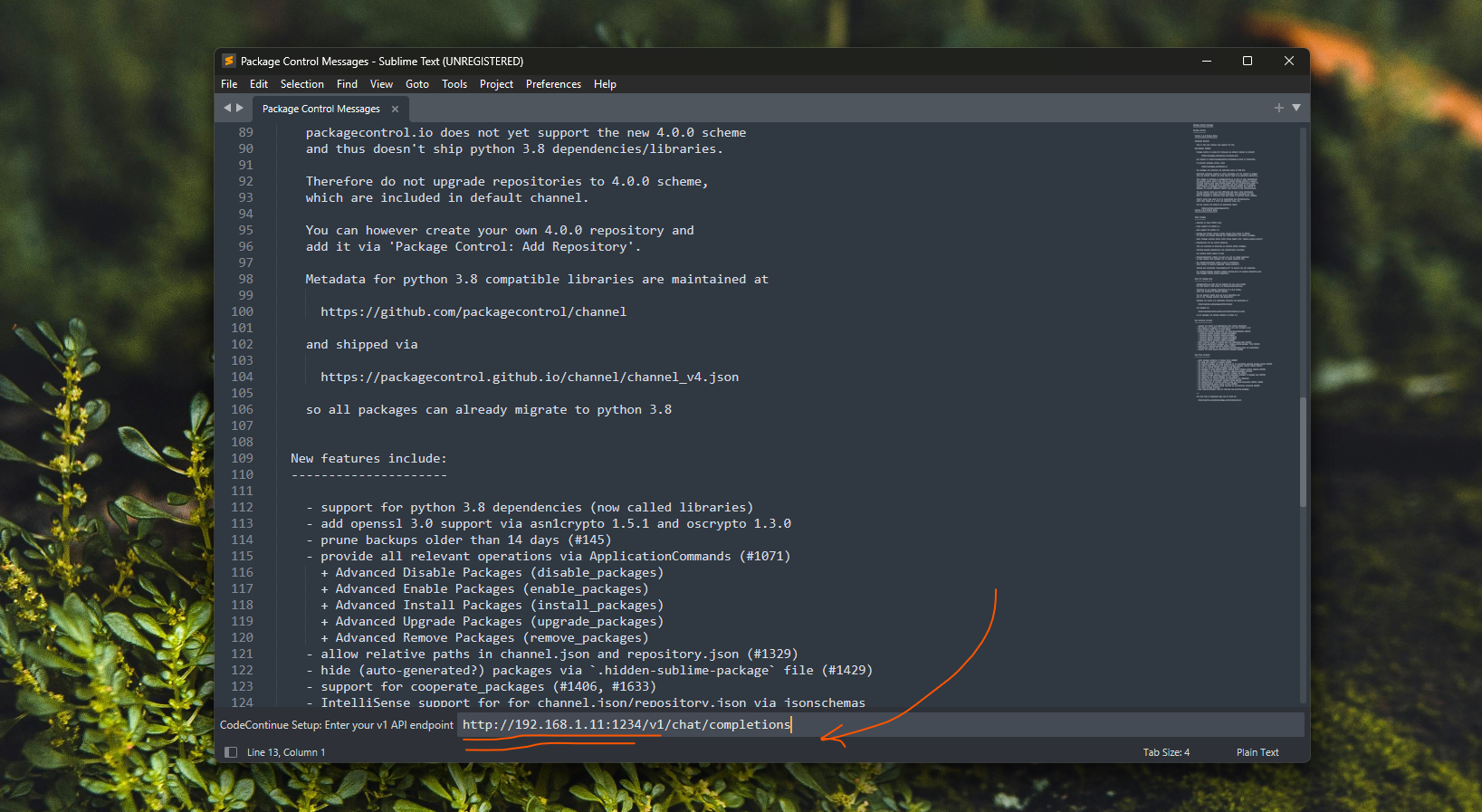
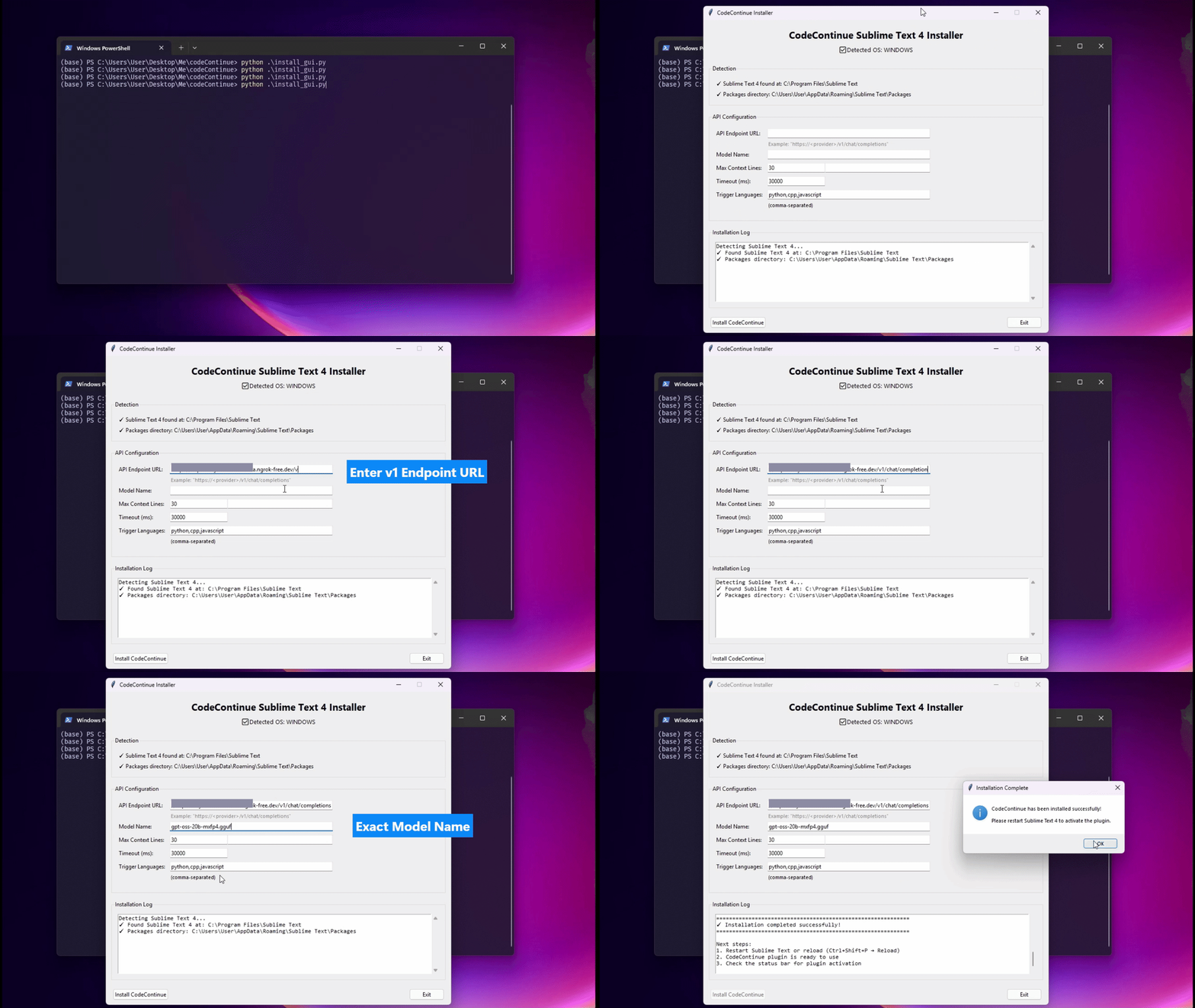
- After installing, a setup wizard appears automatically (if you miss it, open Command Palette and search for "CodeContinue: Configure")
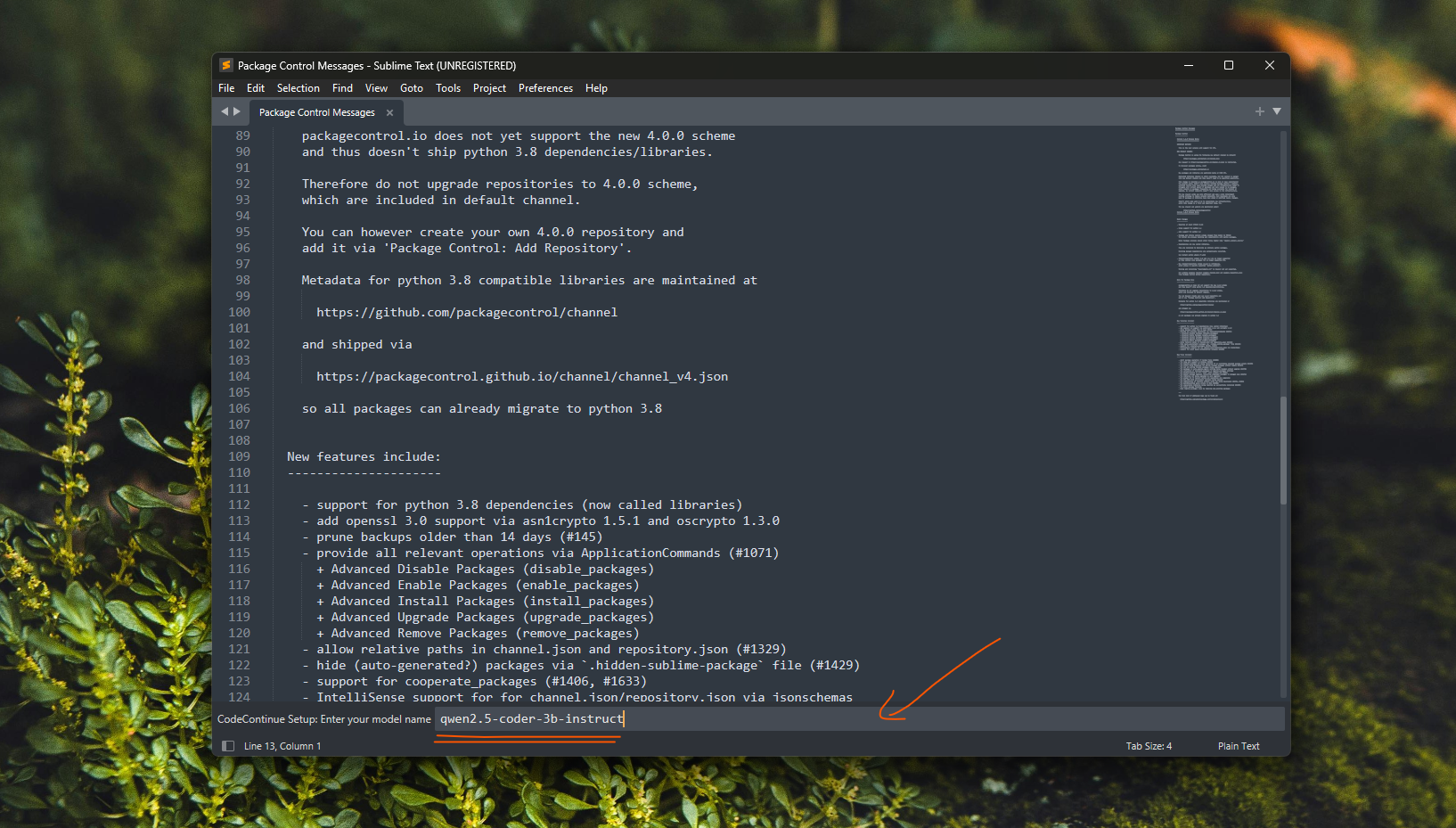
- Enter your API endpoint and model name
Here as you can see below, I am just using LMStudio to run Qwen3-Coder-2.5B-Coder model locally. Get the server address and model name exactly from LMStudio and paste it in the setup wizard.
Enable Key Binding
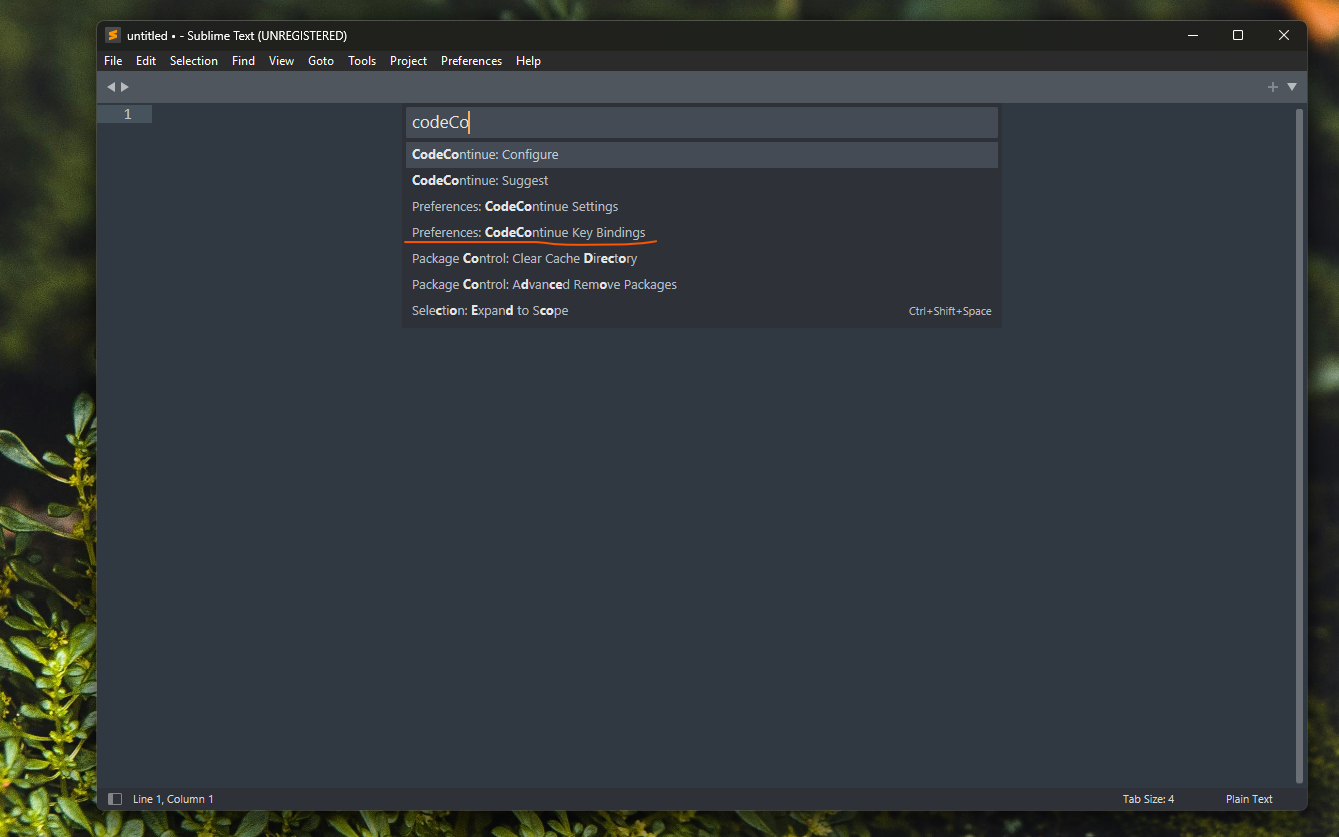
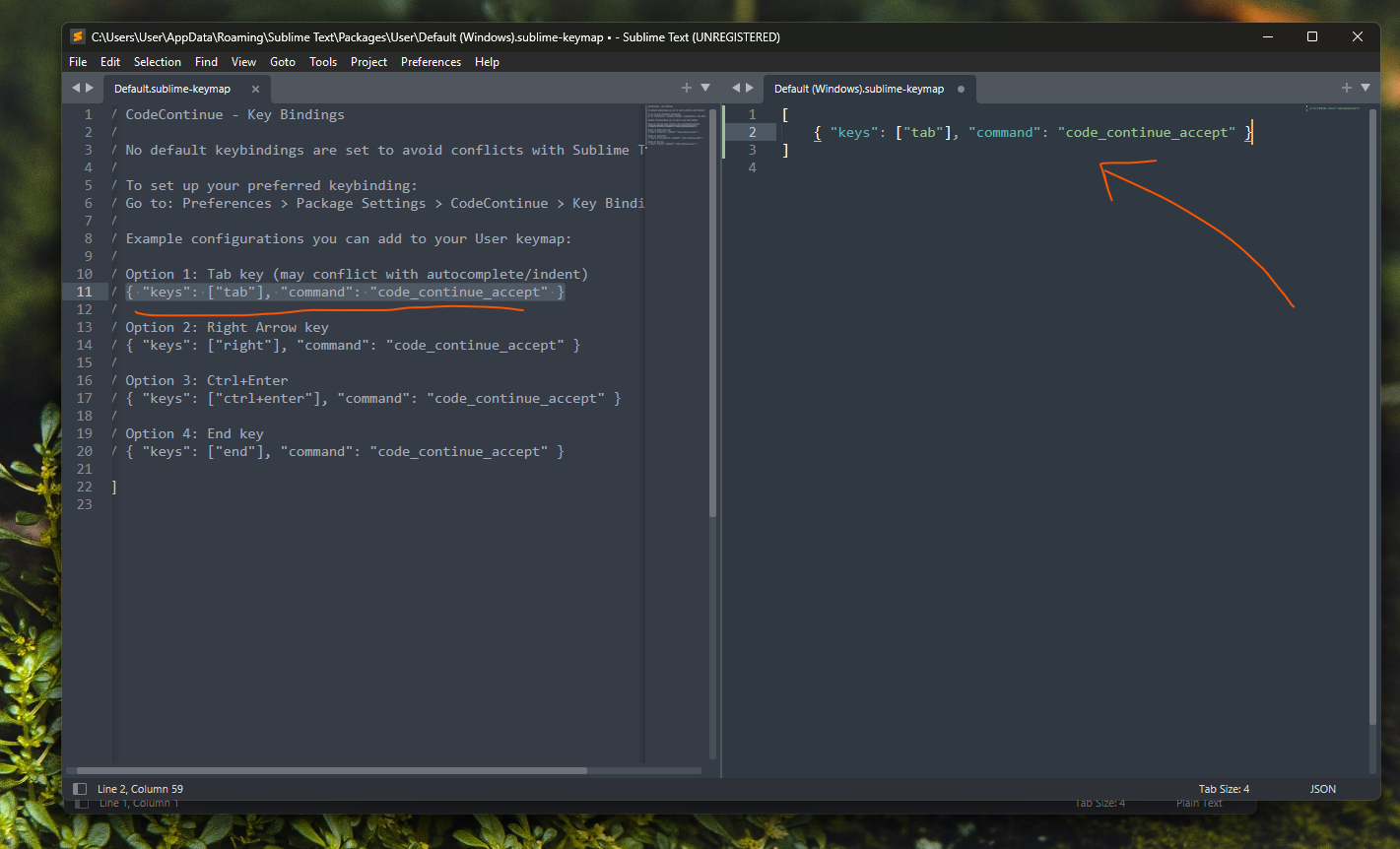
The keybinding is not enabled by default to avoid possible conflicts with other packages. To enable it:
- Open Command Palette
- Type
Preferences: CodeContinue Key Bindingand press Enter - It will show two panes: suggested key binding on left, your custom binding on right
- Copy paste the preferred key and save. That's it!
Package Control not showing up? This can happen sometimes, especially on older Sublime Text installations. The fix is to upgrade Sublime Text to the latest version. On Windows, you may need to uninstall Sublime Text and delete any leftover Sublime files (e.g., from
%APPDATA%and%LOCALAPPDATA%) before reinstalling to get a clean state with Package Control working properly.
Method 2: Manual Install
For those who prefer manual setup or want to contribute:
1# Clone the repository
2git clone https://github.com/kXborg/codeContinue.git
3
4# Option A: CLI Installer
5python install.py
6
7# Option B: GUI Installer (if you prefer a graphical interface)
8python install_gui.py
Both installers:
- Auto-detect your Sublime Text installation (be it macOS, Linux, or Windows)
- Walk you through configuration
- Save settings automatically
Configuration: Your Model, Your Rules
This is where CodeContinue shines. You're not locked into a specific provider or model. Configure it once, and you're good to go.
Essential Settings
Open Command Palette ==> "CodeContinue: Configure" and set:
1. OpenAI-Compatible Endpoint (Required) I used Llama.cpp and vLLM serving engines to serve preferred models locally. You can use any OpenAI-compatible endpoint - LM Studio, Ollama, or cloud based services.
1OpenAI: https://api.openai.com/v1/chat/completions
2Local server: http://localhost:8000/v1/chat/completions
3Other providers: Any v1-compatible endpoint
2. Model Name (Required) The model name must be exactly as it is in the API response. For example, if you are using Qwen coder model, name should be "Qwen/Qwen2.5-Coder-1.5B-Instruct".
3. API Key (Optional)
1Only needed if your endpoint requires authentication
2For OpenAI: sk-...
3For local models: usually not needed
Advanced Settings
Fine-tune the behavior:
1{
2  "max_context_lines": 30,      // More context = better suggestions, slower response
3  "timeout_ms": 20000,           // Increase if your server is not fast enough
4  "trigger_language": [          // Enable for specific languages
5    "python",
6    "cpp",
7    "javascript",
8    "typescript",
9    "java",
10    "go",
11    "rust"
12  ]
13}
Using Local Models
This is my favorite part. You can run CodeContinue entirely offline with local LLMs.The following models have been tested and found working decent.
1Tested and working:
2- gpt-oss-20b, Hardware: RTX3060, 12GB vRAM, Llama.CPP
3- Qwen/Qwen2.5-Coder-1.5B-Instruct, Hardware: RTX3060, 6GB vRAM, vLLM
No data leaves your machine. No subscription fees. Complete privacy.
Why Sublime Text?
You might ask: "Why Sublime Text in 2026?" Fair question. Here's my answer:
- Speed: Sublime is still the fastest text editor I've used
- Simplicity: No bloat, no distractions, just code
- Customization: Python-based plugins, full control
- Stability: It just works, every time
- Old School Cool: Sometimes the classics are classic for a reason
Plus, Sublime's plugin API made building CodeContinue straightforward. The entire plugin is ~500 lines of Python.
Real-World Usage of codeContinue
I've been using CodeContinue daily for the past few weeks. Here's what I've learned:
What codeContinue Is Great For? (I feel)
✅ Boilerplate code: Function signatures, class definitions, imports
✅ Common patterns: Loops, conditionals, error handling
✅ Syntax reminders: "What's the syntax for X in language Y again?"
✅ Context-aware suggestions: Understands your codebase patterns
What codeContinue Is Not For? (at least for now - Feb, 2026)
❌ Complex algorithms: Use your brain for this
❌ Entire functions: That's what agentic tools are for
❌ Architecture decisions: Still your job
❌ Code review: Always review what you accept
Performance Notes
With a local model (Qwen2.5-Coder-1.5B on my RTX 3060):
- Suggestion latency: ~200-400ms
- Context window: 30 lines
- Accuracy: Surprisingly good for simple completions
With GPT-oss-20b:
- Suggestion latency: ~1 second
- Context window: 30 lines
- Accuracy: Excellent, but need more vRAM
The Philosophy: Control Over Convenience
Here's the thing about modern developer tools: they're optimizing for convenience at the expense of control.
Agentic coding tools will write entire functions for you. That's convenient. But it also means:
- You're not thinking through the logic
- You're not learning the patterns
- You're not in control of the implementation
- You're dependent on the AI's interpretation
CodeContinue takes a different approach: augment, don't replace.
It's like the difference between:
- A calculator that shows you the steps (CodeContinue)
- A calculator that just gives you the answer (Agentic tools)
Both have their place. But for day-to-day coding, I prefer to stay in control.
Privacy and Data Ownership
Let's talk about the elephant in the room: data privacy. When you use cloud-based coding assistants, your code goes to remote servers. Sometimes it's used for training. Sometimes it's stored. Sometimes it's analyzed for "improving the service."
With CodeContinue:
- Local models: Your code never leaves your machine
- Self-hosted endpoints: You control the infrastructure
- OpenAI/others: You choose what to send and when
You're in control of your data. Always.
Troubleshooting Common Issues
I've tried to make CodeContinue as robust as possible, but here are common issues and fixes:
Setup wizard not appearing?
Command Palette ==> "CodeContinue: Configure"
Suggestions not appearing? Go to view > show console and check for errors.
11. Check your API endpoint is reachable
22. Verify model name is correct
33. Check timeout settings (increase if needed)
44. Look at Sublime's console for errors (Ctrl+`)
If you are still stuck, open an issue on GitHub.
Timeout errors?
1{
2  "timeout_ms": 30000  // Increase from default 20000
3}
Keybindings not working?
Keybindings are not set by default : you need to configure them once after installation. Check steps mentioned above to enable them. Sometime, other packages might have already occupied the keybindings you want to use. In that case, choose different keybindings for CodeContinue. For example, ctrL+ Enter or Right Arrow Key.
What's Next for CodeContinue?
This is version 1.0, but I have plans. Package Control submission has been accepted and CodeContinue is now live on Package Control! To comply with Package Control community guidelines, keybindings are not shipped by default — they need to be configured once after installation. This avoids conflicts with other packages and keeps things clean.
Future plans:
- Fallback model incase of server unavailability or timeout. It won't be as powerful, but it will still help.
- Support for other editors (VS Code, Neovim), but I highly doubt if I will be able to compete with default Tab completion in VSCode. Can't deny, it's pretty good.
- Typo detection and correction suggestions
- Select chunk and pass comment to modify it. Kind of in the same vein as Cursor editor.
Try It Yourself
If you're tired of being pushed toward cloud-based, data-hungry coding assistants, give CodeContinue a shot. I'm sure you won't be disappointed. Well, if you are - bash me in the comments. I try to match your expectations.
GitHub: https://github.com/kXborg/codeContinue. You can download the same using the download code button on the right (for desktop users).
Quick Start:
1git clone https://github.com/kXborg/codeContinue.git
2cd codeContinue
3python install_gui.py
Configure your endpoint, choose your model (again -- pass exact model name), and start coding with intelligent suggestions that don't take away your control.
Final Thoughts on codeContinue Plugin
The death of IntelliSense isn't just about losing a feature. It's about the industry pushing developers toward a specific vision of how we should code. One that prioritizes AI agency over human control.
I'm not against AI in coding. I use it daily. But I believe we should have choice:
- Choice of tools
- Choice of models
- Choice of how much control to delegate
- Choice of where our data goes
CodeContinue is my small contribution to preserving that choice. It's not perfect, but it's a start. If you value control over your coding workflow, privacy over convenience, and simplicity over bloat, give it a try. And if you build something cool with it, or have ideas for improvements, I'd love to hear about it. Drop a comment below or open an issue on GitHub.
Happy coding! 🚀
P.S.: If you're wondering about the name, "CodeContinue" is a play on "Continue" (the AI coding assistant). The idea of continuing your code with minimal suggestions. Plus, it sounds better than "NotIntelliSense" 😄.
Previous Post
The Kernel Trick in Support Vector Machines (SVMs)
Next Post
Self-Hosting LLMs: A Guide to vLLM, SGLang, and Llama.cpp
If the article helped you in some way, consider giving it a like. This will mean a lot to me. You can download the code related to the post using the download button below.
If you see any bug, have a question for me, or would like to provide feedback, please drop a comment below.