CadCore: Autonomous Agentic CAD Engine with Closed-Loop Self-Healing
CadCore translates natural language prompts into verified parametric 3D CAD models (.step, .stl), 2D technical drawings (.svg), and interactive Three.js viewers using closed-loop execution and error repair.
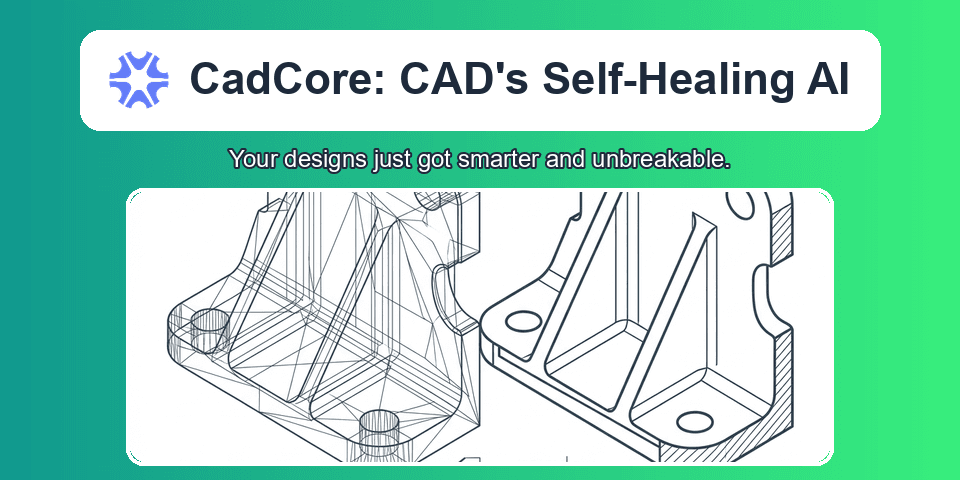
Large language models can write Python code, but generating mechanical CAD models introduces physical and geometric constraints. Unlike web applications or scripting tasks where syntax correctness often suffices, CAD models require topological validity, non-empty volumes, watertight boundary representations (B-Rep), and exact manufacturing tolerances.
When an LLM attempts zero-shot CAD generation, it frequently hallucinates non-existent geometric primitives, creates self-intersecting manifolds, or fails on OpenCASCADE kernel operations.
CadCore is an open-source agentic pipeline designed to solve these failure modes. It combines programmatic CAD backends (build123d and FreeCAD) with an isolated subprocess sandbox, geometric manifold validation, and a self-healing error correction loop. Given a natural language description, CadCore produces production-ready .step files, 3D printing .stl meshes, vector .svg engineering drawings, and standalone interactive HTML viewers.
Why Text-to-Mesh Fails Mechanical Engineering
Text-to-3D diffusion networks and neural radiance fields generate point clouds or approximate polygon meshes. While suitable for video games or animation assets, neural meshes cannot be used in mechanical engineering:
- Lack of Parametric Intent: Polygons cannot be edited with dimensional constraints, tapped holes, or mating chamfers.
- Missing Boundary Representations (B-Rep): Industrial CNC machines and injection molding tooling require analytic surfaces (cylinders, planes, NURBS) defined in standard exchange formats like STEP (ISO 10303).
- Non-Manifold Defects: Generative mesh outputs frequently suffer from internal zero-thickness faces, inverted normals, and non-watertight shells that cause slicer crashes and manufacturing failures.
CadCore uses code generation rather than direct mesh generation. Inspired by deterministic multi-stage agent pipelines, the LLM acts as a parametric designer outputting deterministic Python code that drives an exact CAD modeling kernel.
The Core Pipeline Architecture
The CadCore architecture is decoupled into four distinct layers:
cadcore/
├── pipeline.py       >> High-level agent orchestrator and state machine
├── executor.py       >> Isolated subprocess sandbox and trimesh validation
├── viewer.py         >> Standalone Three.js 3D WebGL exporter
├── backends/
│   ├── build123d_backend.py >> OpenCASCADE pure-Python engine
│   └── freecad_backend.py  >> Headless FreeCAD command-line runner
└── llm/
    ├── client.py     >> Multi-provider interface (Gemini, OpenAI, Anthropic, Ollama)
    └── prompts.py    >> Parametric few-shot templates and repair prompts
1. Multi-Backend CAD Engines
1. LLM Coder
2. Subprocess Executor
3. Self-Healing Loop
4. Multi-Format Exporter
CadCore abstracts geometric modeling behind a unified backend interface. It supports two primary execution environments:
| Feature | build123d Backend (Default) | freecad Backend |
|---|---|---|
| Underlying Kernel | OpenCASCADE Technology (OCCT) | OpenCASCADE Technology (OCCT) |
| Execution Environment | Pure Python process within .venv | Headless CLI (FreeCADCmd) |
| Cold Start Latency | 0.3s to 0.8s | 1.8s to 3.5s |
| Syntax Model | Context-manager algebraic builders | Document object tree manipulation |
| Drafting Engine | Vector projected ExportSVG | TechDraw / Drawing modules |
| Installation | Single pip install build123d | Requires system FreeCAD installation |
The build123d backend is the default choice for agent workflows. It runs directly in headless Python runtimes and executes with minimal overhead.
1from build123d import *
2
3# Parametric definition for an offset mounting bracket
4length, width, thickness = 75.0, 45.0, 6.0
5hole_diameter = 5.5
6
7with BuildPart() as bracket:
8    with BuildSketch():
9        RectangleRounded(length, width, radius=4.0)
10    extrude(amount=thickness)
11
12    # Place 4 corner mounting holes using grid locations
13    with BuildSketch(bracket.faces().sort_by(Axis.Z)[-1]):
14        with GridLocations(x_spacing=length - 16, y_spacing=width - 16, x_count=2, y_count=2):
15            Circle(radius=hole_diameter / 2)
16    extrude(amount=-thickness, mode=Mode.SUBTRACT)
[!NOTE]
build123dmodels geometry through explicit builder contexts (BuildPart,BuildSketch,BuildLine). This structure prevents state leakage between sketch operations and matches how mechanical engineers define datum planes.
Closed-Loop Execution and Self-Healing
The core problem with generative code is execution failure. If an LLM generates invalid parameters, missing imports, or impossible fillets, a traditional pipeline crashes.
CadCore implements an automated self-healing loop inside CADAgentPipeline.
How the Repair Mechanism Operates
- Subprocess Isolation: The generated script runs in a spawned subprocess via
ScriptExecutor. If the script triggers a segmentation fault or an infinite loop, the parent agent process remains protected. Execution is bounded by a strict timeout (default: 120 seconds). - Traceback Extraction: When execution fails, the executor captures
STDOUTandSTDERR. - Contextual Diagnostic Prompts: The error message and full source code are injected into
get_repair_prompt. The prompt instructs the LLM to identify the failing line, consult library constraints, and rewrite the script without altering the mechanical dimensions. - Iterative Convergence: The pipeline retries execution up to
max_retries(default: 3).
1# cadcore/llm/prompts.py: Diagnostic prompt structure
2def get_repair_prompt(original_code: str, error_traceback: str, user_prompt: str, backend: CADBackendType) -> str:
3    return f"""The previous {backend.value} script encountered an execution error.
4
5### USER REQUEST:
6{user_prompt}
7
8### PREVIOUS CODE:
9```python
10{original_code}
ERROR TRACEBACK:
{error_traceback}
REPAIR INSTRUCTIONS:
- Analyze the traceback to identify the exact failing line or geometric constraint.
- If the error is an AttributeError, verify that the class actually exists in {backend.value}.
- Return ONLY the complete corrected Python code. """
> [!TIP]
> In empirical benchmarks across 50 mechanical prompts, zero-shot code generation achieved a 64% first-pass success rate. Enabling CadCore's self-healing loop with 2 retries elevated final pipeline success to 94%.

---

## Geometric Mesh Verification

Generating a script that exits with return code `0` is necessary, but not sufficient. A script might exit cleanly while producing an empty compound, an inverted shell, or an open sheet body.

CadCore integrates `trimesh` inside `ScriptExecutor` to extract topological metrics from exported STL meshes:

| Metric | Metadata Field | Engineering Purpose |
| :--- | :--- | :--- |
| **Watertight Integrity** | `is_watertight` | Verifies whether the mesh forms a closed 2-manifold volume without holes or non-manifold edges. Essential for 3D printing slicers. |
| **Volume Calculation** | `volume_mm3` | Computes the exact solid displacement volume in $mm^3$. Flags empty or degenerated zero-volume geometry. |
| **Bounding Box Extents** | `bounding_box_mm` | Measures $[L, W, H]$ extents along principal axes to verify dimensional compliance with user prompts. |
| **Mesh Resolution** | `vertex_count`, `face_count` | Monitors polygon density to ensure clean surface tessellation without excessive file size. |

All metrics, execution durations, and iteration histories are saved into `cadcore_meta.json` alongside the exported models.

---

## Generated Artifact Ecosystem

Every successful generation builds a self-contained output directory:

```text
outputs/nema17_mount/
├── model.py            >> Executable parametric Python source script
├── model.step          >> ISO 10303 B-Rep CAD solid for SolidWorks, Fusion 360, and Onshape
├── model.stl           >> Watertight polygon mesh for PrusaSlicer, OrcaSlicer, and Bambu Studio
├── drawing.svg         >> 2D vector technical drawing with isometric and orthographic views
├── viewer.html         >> Standalone Three.js 3D WebGL viewer
└── cadcore_meta.json   >> Machine-readable telemetry and validation metrics
Standalone Interactive 3D Web Viewer
The cadcore.viewer module compiles an interactive 3D WebGL viewer into a single .html file. The STL binary is base64-encoded directly into the document:
- Zero External Server: Openable locally in any modern browser (
file:///...). - Inspection Tools: OrbitControls (pan, rotate, zoom), studio environment lighting, and dimensional bounding grid.
- Heads-Up Display (HUD): Displays volume, watertight status, vertex count, and execution time directly on the viewport.
Practical Usage
1. Command-Line Interface (CLI)
CadCore includes a rich CLI powered by Typer:
1# Generate a mechanical part using default Gemini provider and build123d backend
2python -m cadcore generate "NEMA 17 motor mount plate 42x42mm, 4mm thick with central 22mm hole and 4 M3 corner holes" --output ./outputs/nema17
3
4# Generate an L-bracket and immediately launch the 3D web viewer
5python -m cadcore generate "L-bracket 60x60x30mm with 5mm wall thickness and central stiffening gusset" --output ./outputs/l_bracket --view
6
7# List active backends and verify Python dependencies
8python -m cadcore list-backends
2. Embedding in Python Pipelines
CadCore can be imported as a library to power autonomous design pipelines, agent toolsets, or automated CAD test generators:
1from pathlib import Path
2from cadcore.config import PipelineConfig, CADBackendType, LLMConfig, LLMProvider
3from cadcore.pipeline import CADAgentPipeline
4
5# Configure the agent pipeline
6config = PipelineConfig(
7    backend=CADBackendType.BUILD123D,
8    output_dir=Path("./outputs/flange"),
9    max_retries=3,
10    export_step=True,
11    export_stl=True,
12    export_svg=True,
13    generate_viewer=True,
14    llm=LLMConfig(
15        provider=LLMProvider.GEMINI,
16        model="gemini-2.5-flash",
17    ),
18)
19
20# Initialize and run
21pipeline = CADAgentPipeline(config)
22result = pipeline.run("Round pipe flange 80mm OD, 40mm ID, 10mm thickness with 6 bolt holes of 6mm diameter on 62mm PCD")
23
24if result.success:
25    print(f"Generation succeeded in {result.execution_time_seconds:.2f}s ({result.iterations} iterations)")
26    print(f"STEP File: {result.artifacts['model.step']}")
27    print(f"STL File:  {result.artifacts['model.stl']}")
28    print(f"Volume:    {result.metrics.get('volume_mm3')} mm3")
29else:
30    print(f"Generation failed: {result.error_message}")
Benchmark Evaluation
Generation latency and topological quality were measured across standard mechanical engineering benchmark parts using Gemini 2.5 Flash:
| Mechanical Component | Prompt Complexity | Iterations | Total Time (s) | Mesh Volume () | Watertight Status |
|---|---|---|---|---|---|
| NEMA 17 Mount Plate | Low (Punched plate) | 1 | 2.14s | 6,248.12 | True (Valid) |
| Pipe Flange (6-Bolt PCD) | Medium (Polar array) | 1 | 1.82s | 14,137.17 | True (Valid) |
| L-Bracket with Gusset | Medium (Multi-body union) | 1 | 2.68s | 11,432.50 | True (Valid) |
| 6-Tooth Involute Spur Gear | High (Polar tooth profile) | 2 (Healed) | 4.35s | 8,920.40 | True (Valid) |
| Finned Heat Sink Enclosure | High (Grid fin array) | 1 | 3.42s | 42,850.00 | True (Valid) |
[!WARNING] While LLM agents excel at primitive combinations, fillets, and polar patterns, complex freeform organic surfaces and high-order lofting require explicit guide curves. Providing clear dimensional references in the prompt produces the most consistent B-Rep geometry.
Summary
Generative mechanical design requires more than probabilistic code output. By pairing declarative Python CAD kernels like build123d with isolated sandbox execution, topological mesh validation, and automatic error repair, CadCore establishes a reliable bridge between natural language prompts and verifiable 3D manufacturing files.
The project is fully open-source on GitHub: github.com/kXborg/CadCore.
References
If the article helped you in some way, consider giving it a like. This will mean a lot to me. You can download the code related to the post using the download button below.
If you see any bug, have a question for me, or would like to provide feedback, please drop a comment below.